YouTube → Shorts
YouTube to Shorts Converter
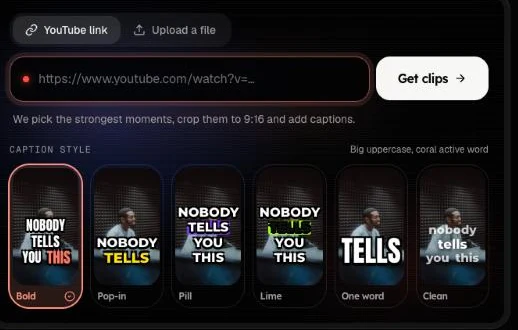
Paste a YouTube link. The AI picks the strongest moments, crops them to 9:16 around the speaker and burns in word-by-word captions.
Free account · 20 minutes a month · videos up to 30 minutes
Updated · OpenShorts.io
01
Paste a link, get clips
1. Paste the YouTube link
Use the box above or the workspace. Sign in with Google or an email code; there is no password and no card needed for the free plan.
2. Pick a caption style
Six looks are built in, from bold karaoke-style highlights to one word at a time or clean sentence case. The captions are burned into the video, so they show the same on every platform.
3. Download the clips you want
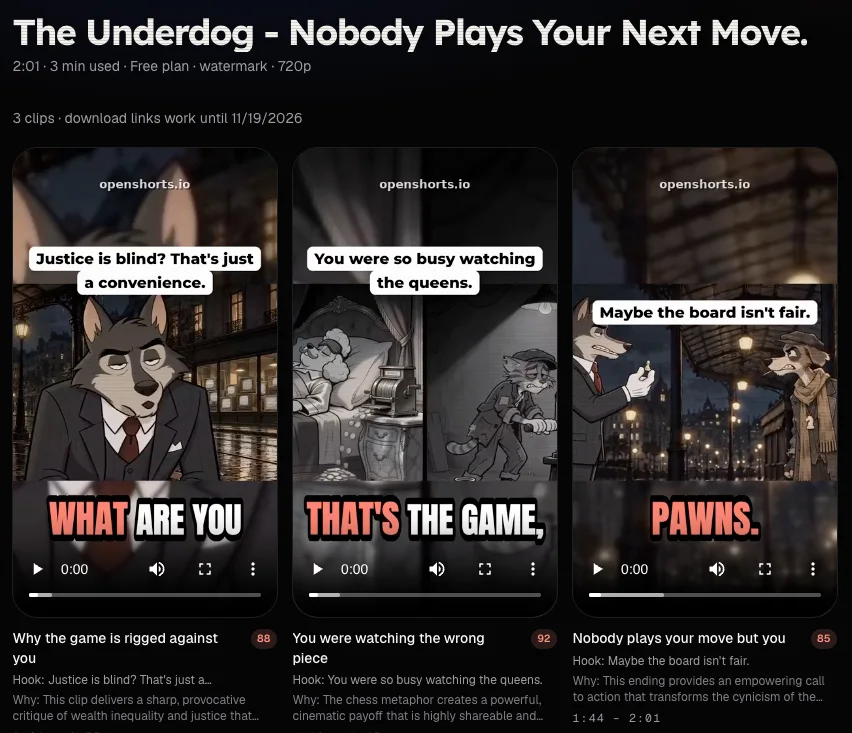
Each clip comes with a score from 0 to 100, a one-line reason, an opening hook line, and ready-to-paste TikTok and Instagram captions. The job page shows every step while it runs, and you can get an email when it is done.
02
How long YouTube videos are handled
The whole video is transcribed, then scored window by window, so a clip starts where a sentence starts and ends where the thought ends. The longest video you can submit depends on the plan: 30 minutes on Free, up to 180 minutes on Pro and Business.
Minutes are counted on the source: a 45-minute podcast uses 45 minutes, however many Shorts come out. If processing fails, the minutes are returned. On our current servers a video of a few minutes takes roughly 10 to 20 minutes to process, and longer videos take proportionally longer, so you can leave the page and come back.
Speech in other languages is transcribed too; the captions are written in the language that is spoken.
03
Framing: facecam, gameplay, split screen
The video is cut into scenes, and each scene gets its own framing.
One person talking
With one face on screen, the crop follows the speaker. It moves smoothly instead of jumping, and starts fresh at every scene cut.
Gameplay with a facecam
A small facecam counts as a face, so the crop may follow the camera corner and cut the game. For gameplay, check the result; if the game matters more than the face, the aspect ratio converter can pad the full frame into 9:16 instead.
Two people or a wide shot
With no face or several faces, the whole shot is kept and shown over a blurred copy of itself, so nobody is cut off. Two speakers can also be stacked as a split screen, with the captions on the seam.
04
What it does not do
- It does not let you set your own start and end times yet.
- It does not add B-roll, music or emoji.
- It does not remove copyrighted music; the platform you post to may mute or block it. Clip only videos you have the right to use.
- It does not post to your channels for you.
05
Free vs self-hosted
| Free plan online | Self-hosted (MIT) | |
|---|---|---|
| Setup | None, sign in and paste a link | Docker on your machine |
| Minutes | 20 a month | No cap |
| Export | 720p with a watermark | Full resolution, no watermark |
| Where it runs | Our servers | Your hardware, plus the model API you set |
More minutes and 1080p without a watermark are on the paid plans; the self-host guide covers running it yourself.
06
YouTube to Shorts questions
How long can the YouTube video be?
Up to 30 minutes on the free plan, 120 minutes on Starter and Creator, and 180 minutes on Pro and Business. The whole length counts towards your monthly minutes.
Does it work with any YouTube link?
It works with a link to one public video: a normal watch link, a youtu.be link, a Shorts or a live replay. Playlists, channels and search pages are refused, and private or removed videos cannot be fetched.
Do I need to download the video first?
No. Paste the link and the video is fetched on our servers. If YouTube blocks the download, you can upload the file instead.
Is there a watermark?
Free exports carry a small watermark and are 720p. Paid plans export 1080p without a watermark, and the self-hosted build never adds one.
Can I choose which moments get clipped?
The AI picks the moments and gives each clip a score and a reason, so you choose which to post. Picking your own start and end times is not available yet.
Does it work for Shorts under 60 seconds?
A video that is already short has few moments to pick from, so you may get one clip or none. To change only the shape of a short video, use the aspect ratio converter.
Next
Paste a YouTube link and see the clips before you pay.