Use cases · Clipping campaigns
Clipping Campaigns: How They Pay, and How to Clip Faster
Clipping campaigns pay you to cut a creator’s or brand’s long videos into Shorts and post them on your own accounts. Here is how the money works, what gets a clip approved, and how to make more clips in less time.
Free account · 15 minutes a month · no card
Updated · OpenShorts.io
01
How clipping campaigns work
Clipping campaigns are paid briefs: a creator or brand supplies long videos, and clippers cut them into short vertical clips, post them on their own TikTok, Instagram Reels and YouTube Shorts accounts, and get paid per thousand qualified views. Content clipping is the job; the campaign is the deal that pays for it.
The chain is always the same: long video, then the highlight, then a 9:16 crop with captions, then a post on your account, then a view count the program verifies. The rate and the budget cap are set on each campaign’s page, and the campaign stops paying once its budget is spent.
| Term | What it means for you |
|---|---|
| Source footage | Only the videos the campaign owns or licenses |
| Rate | Paid per thousand qualified views |
| Budget cap | Payouts stop when the budget is spent |
| Platforms | Where clips may be posted, often all three |
| Rules | Length, captions, tags and disclosure lines |
| Verification | Views are read from the platform and checked |
| Posting window | How long after the start clips still count |
| Campaign end | When it closes and pending earnings are paid |
That is how people get paid to clip videos without being hired as editors: the pay follows the views, not the hours.
02
What a clipping program checks before it approves a clip
A clipping program approves a clip when it follows the brief and looks native to the platform. The checks differ by program, but the same four come up again and again.
- Picture quality. A sharp 1080p export, no stretched or letterboxed frames.
- Framing. In a 9:16 crop the speaker’s face stays in frame; a crop that cuts the face off reads as a re-upload.
- Captions. Burned in, easy to read on a phone and spelled right, names included.
- The first three seconds. The clip starts on the line that makes people stay, not on a breath or a half sentence.
| Rejected because | Fix before you post |
|---|---|
| Blurry or low-resolution picture | Export at 1080p from the original file |
| Face cut off or off-centre in 9:16 | Use a crop that follows the speaker |
| Captions cover the face | Keep captions in the lower third |
| Slow opening, no hook | Start on the strongest line |
| Wrong length | Trim to the range in the brief |
Most clipping platforms also reject fake engagement and can claw back earnings for it. Post where your audience is real.
03
Vyro clipping: what to prepare before you submit
Vyro clipping works like any clipping campaign: you clip the footage a brand provides, post it on your own accounts, and Vyro counts the verified views. Rules and payout terms are set by Vyro and each campaign, so check them on the campaign page before you start.
What you can prepare is the same for every campaign there, the MrBeast clipping campaigns included:
- The campaign’s own source video, not a re-upload of it.
- Clips at the length the brief asks for.
- A 9:16 vertical export at 1080p.
- Captions burned into the picture.
- An MP4 file that uploads to every platform the brief names.
04
Where to find clipping campaigns
Clipping campaigns are posted in three kinds of places. Whichever you use, the brief matters more than the listing: it tells you the footage, the rate, the budget left and the rules.
Whop clipping campaigns
Whop hosts content reward campaigns run by creators and brands. Listings come and go as budgets run out, so check how much budget is left and how views are verified before you put hours into clips.
To judge a Whop campaign, look for three things: a named creator or brand behind it, a record of earlier campaigns that paid out, and a clear line on what counts as a qualified view. If any of the three is missing, ask in the campaign’s community before you start.
Clipping campaign websites and Discords
Dedicated clipping platforms list campaigns from many brands in one place and handle the view tracking. Many creators also run their own Discord for clippers, and some recruit on Reddit. Clipping jobs found this way often pay the same way: per view, not per clip.
In a Discord, read the pinned brief and the payout channel first: they show how often payouts happen and how disputes are handled. On Reddit, prefer posts from the creator’s own account or a linked platform listing, and skip anyone who asks for a fee to join.
Best clipping campaigns by niche
Pick footage you would watch yourself: you will spot the strong moments faster.
- Podcasts and interviews: lots of footage, easy to caption, strong single lines. Look for answers that stand on their own without the question.
- Gaming and streams: fast reactions; check that a facecam crop does not hide the game. The clip has to make sense to someone who never saw the stream.
- Brand and UGC campaigns: stricter rules on wording, tags and disclosure. Copy the required lines exactly as the brief gives them.
- Shows and trailers: many clips per episode, so speed matters most. Batch a whole episode at once and post the strongest moments first.
05
Clip faster with OpenShorts.io
OpenShorts.io turns one long video into captioned 9:16 clips, so your time goes into choosing what to post. Paste a YouTube link or upload the campaign’s file and pick a caption style.
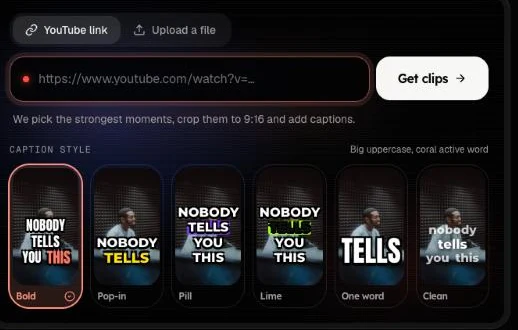
You get back:
- Vertical crops that follow the speaker’s face.
- Captions burned in and highlighted word by word.
- A score from 0 to 100 and a one-line reason for every clip, plus a hook line and ready-to-paste TikTok and Instagram captions.
- 1080p exports without a watermark on paid plans, and 2 to 5 videos processing at once.
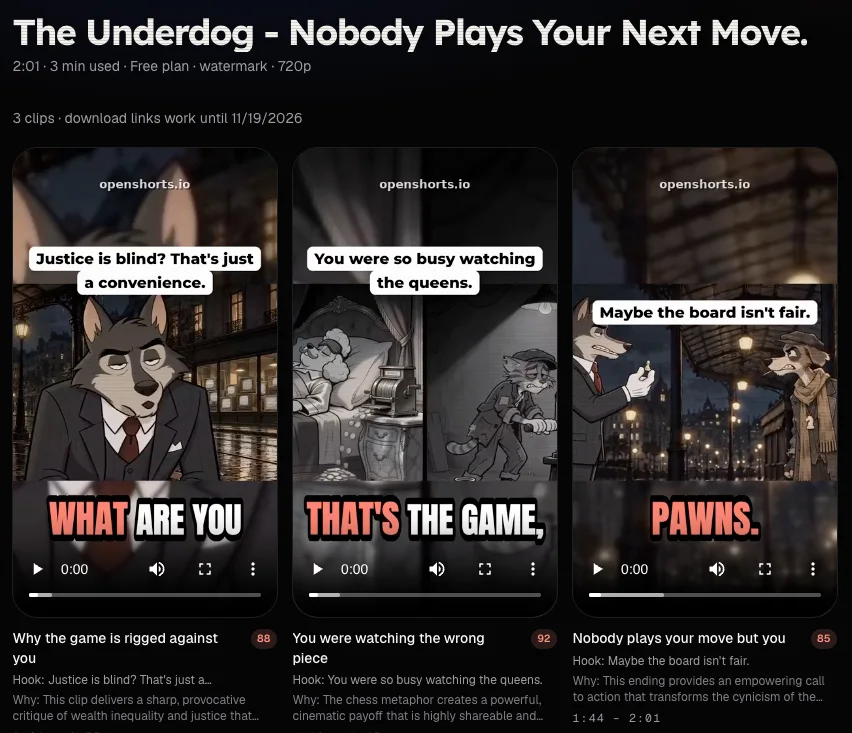
Start with the free clipping AI: a free account gives 15 minutes of source video a month at 720p with a watermark, enough to test one campaign’s footage. For clips you post, a paid plan gives the clean 1080p export; OpenShorts.io pricing starts at $11.90 for 120 minutes a month.
06
Clipping campaign questions
How do clipping campaigns pay?
Most pay per thousand qualified views: views on clips that met the brief and passed the program’s checks. The rate, the budget cap and any minimum views are set on each campaign’s page, and earnings usually stay pending until views are verified.
How much can you earn from a clipping campaign?
It is your qualified views multiplied by that campaign’s rate, up to its budget cap. We don’t publish payout figures because they change per campaign; read the rate on the campaign page before you start clipping.
Do I need special software for clipping campaigns?
No, any editor that exports a vertical video works. An AI clipper saves the slow parts: finding the moments, cropping to 9:16 around the speaker and adding captions. You still choose which clips to post.
How do I know if a clipping campaign is legit?
Check four things before you clip: the campaign names who owns the footage; the rate and the budget left are shown up front; it explains how views are verified and what counts as qualified; and it says when payouts happen. Walk away from any campaign that asks you to pay to join or to buy views.
What is Vyro’s payout rate for clippers?
There is no single published rate. Each campaign sets its own rate per thousand verified views and its own budget cap, so check the campaign page.
Is OpenShorts.io part of Vyro or MrBeast?
No. OpenShorts.io is an independent AI clipping tool with no partnership with any clipping program. Use it for any campaign whose rules allow edited clips.
New to the tool? Try OpenShorts, our AI clipper, before you sign up for a campaign.
OpenShorts.io is not affiliated with, endorsed by, or partnered with Vyro or MrBeast. Vyro is a third-party platform. Whop is named only to describe where campaigns are found.
Next
Clip one campaign video free and see which moments score highest.