Platforms · YouTube
YouTube Video Clipper: Turn Long Videos into Clips
A YouTube clipper for long videos: paste a link, and the AI finds the moments worth posting, cuts them in the shape you need and burns in word-by-word captions.
Free account · 15 minutes a month · videos up to 6 hours, the first 15 minutes clipped
01
How the YouTube clipper works
1. Paste the YouTube link
Use the box above or the workspace. Sign in with Google or an email code; no password, and no card for the free plan.
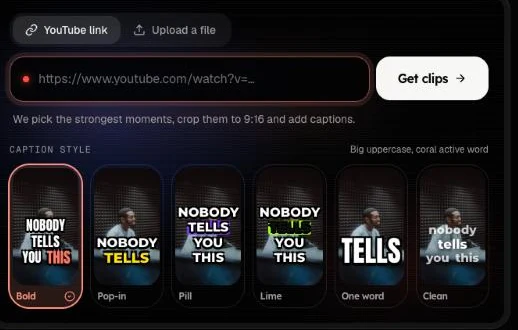
2. Pick a shape and a caption style
Choose 9:16 for Shorts, Reels and TikTok, 1:1 or 4:5 for feed posts, or keep 16:9 for YouTube. Six caption styles are built in, from bold karaoke highlights to one word at a time.
3. Download the clips you want
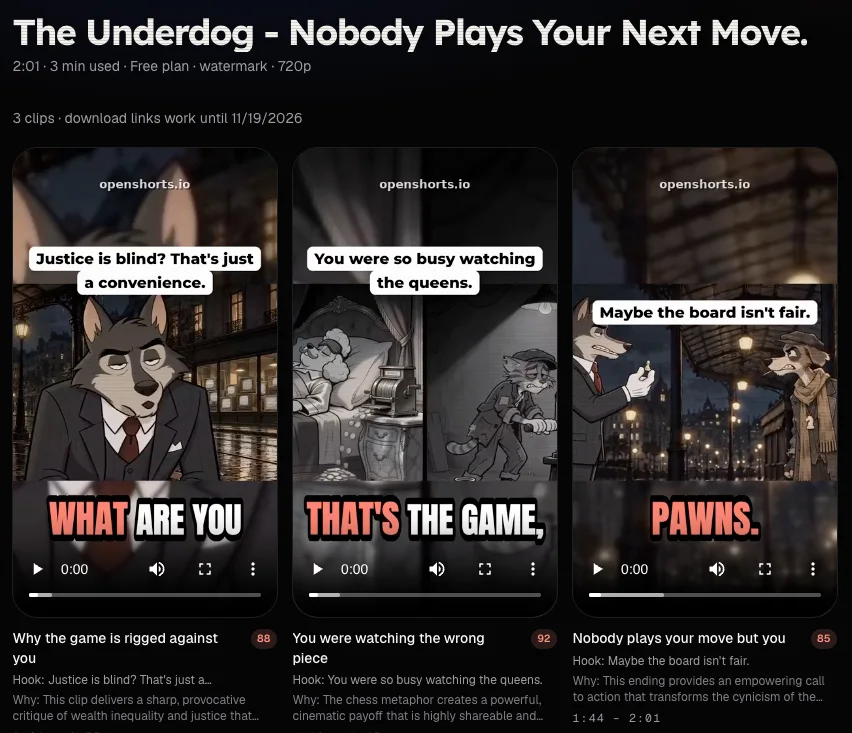
Every clip has a score from 0 to 100, a one-line reason and an opening hook line. Download the ones you like; the rest cost nothing extra, because minutes are counted on the source video.
02
Clips picked from the transcript, not trimmed by hand
The whole video is transcribed with a timestamp on every word, then scored window by window. A clip starts where a sentence starts and ends where the thought ends, so it makes sense without the rest of the video.
That is the difference from a trim tool: you do not scrub a timeline. You get a short list of candidates and choose from it.
03
One long video, clips in any shape
Most YouTube clippers only make vertical clips. Here you choose the shape first: 9:16 for Shorts, Reels and TikTok, 1:1 or 4:5 for feed posts, or 16:9 for a highlight that stays on YouTube or goes to X and LinkedIn.
Links from TikTok, Instagram and Facebook work the same way, so a clipper for YouTube is also a way to recut a video you posted elsewhere. Making vertical Shorts only? The YouTube to Shorts page covers 9:16 framing and caption styles in detail.
04
Long videos, minutes and speed
A source video can run up to 6 hours on Free and 12 hours on paid plans. The clipper works through the start of it: the first 15 minutes on Free, up to 120 on Starter and Plus and up to 180 on Pro and Ultra, or as far as your minutes go.
You pay for the part of the source that is clipped, never per clip, and minutes come back if a job fails. Paid jobs run in a fast lane and are usually ready in about 3–5 minutes.
05
Where this clipper stops
- You choose among the clips it returns; setting your own in and out points is not available yet. For frame-exact cuts, use a video editor.
- There is no timeline, B-roll library or music track.
- Music in the source stays in the clip, and YouTube or another platform may mute it. Clip videos you own or have permission to use.
06
Free plan and self-hosting
| Free plan | Paid plans | Self-hosted (MIT) | |
|---|---|---|---|
| Minutes | 15 a month | 120 to 1,800 a month | No cap |
| Export | 480p, watermark | 720p, no watermark | Full resolution, no watermark |
| Speed | Standard queue | Fast lane, about 3–5 minutes | Your hardware |
| Where | Our servers | Our servers | Docker on your machine |
Free minutes may be temporarily unavailable. See pricing for the paid plans, or the self-host guide to run it yourself. To weigh other tools’ free plans too, compare the free tiers side by side.
07
YouTube clipper questions
What does a YouTube video clipper do?
It takes one long YouTube video and cuts it into several short clips. Here the AI reads the transcript, picks the moments that work on their own, frames each one and burns in captions.
Can I clip a video that is not mine?
Only if you have the right to use it: your own upload, a video you have permission for, or material under a licence that allows it. The platform you post to may block clips of other people’s work.
How long can the YouTube video be?
Up to 6 hours on the free plan and 12 hours on paid plans. The free plan clips the first 15 minutes; Starter and Plus clip up to 120 minutes per video and Pro and Ultra up to 180, counted from the start.
Which links work?
A link to one public video: a watch link, a youtu.be link, a Shorts link or a live replay. Playlists, channels and search pages are refused, and private or removed videos cannot be fetched. Links from TikTok, Instagram and Facebook work too.
Can I get square or landscape clips instead of vertical?
Yes. Pick 1:1 or 4:5 for feed posts, or keep 16:9 for a YouTube highlight; the AI frames each scene for the shape you choose. Free exports are 480p with a watermark, paid plans 720p without one.
Can I set my own start and end?
Not yet. The AI picks the moments and gives each clip a score and a reason; you choose which to download. For exact frame-level cuts, use a video editor.