Use cases · Gaming
GTA 6 Clips to Shorts: Gameplay into Vertical Clips
Record the session, paste the link or upload the file. The AI finds the action, frames it for 9:16 and burns in captions wherever you speak.
Free account · 15 minutes a month · recordings up to 15 minutes
01
How to turn GTA 6 clips into Shorts
1. Paste a link or upload the recording
Paste a YouTube link to your video, or upload the file you recorded. Sign in with Google or an email code; no card for the free plan.
2. Pick 9:16 and a caption style
Choose 9:16 for TikTok, Shorts and Reels, or keep 16:9 for a YouTube upload. Six caption styles are built in, from bold karaoke highlights to one word at a time.
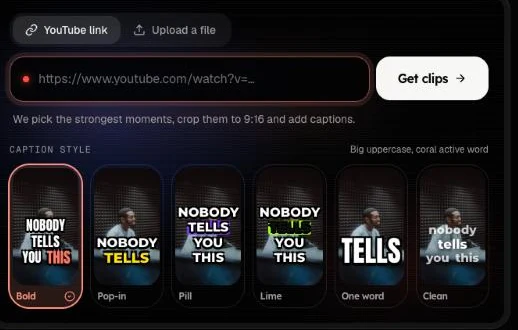
3. Download the clips you want
Every clip has a score from 0 to 100, a one-line reason and an opening hook line. Download the ones you like; minutes are counted on the source video, not per clip.
02
A GTA 6 clip maker that picks the moments
For gameplay on YouTube, game mode turns on by itself. It scores the whole recording second by second: how loud it gets against the moments around it, sudden sounds like gunfire, crashes and explosions, and how much the picture moves and cuts. It uses YouTube's small preview frames, so nothing extra is downloaded.
The best stretches go to an AI that sees four frames from each and anything said in it. It picks the clips, writes a title and an opening hook, and each clip starts a few seconds before the action. Commentary still counts: a reaction or a call-out lifts a moment.
The example frames here are real OpenShorts.io output: a 16:9 clip with its captions, next to vertical crops of the same footage.
03
GTA 6 highlights for TikTok, Shorts and Reels
Pick the shape before you start: 9:16 for TikTok, YouTube Shorts and Reels, 1:1 or 4:5 for feed posts, 16:9 to keep the wide shot. A wide scene is kept whole over a blurred copy of itself, so the action is not cropped away. The same steps work for any GTA clips, from GTA 6 or from earlier games in the series.
How much of each recording is processed depends on the plan: 15 minutes on Free, 120 on Starter and Plus, 180 on Pro and Ultra. Recordings can be up to 6 hours long on Free and 12 hours on paid plans. Paid jobs run in a fast lane and are usually ready in about 3–5 minutes.
04
What it does not do
- Game mode works on YouTube links for now. Uploaded files and other links pick moments from speech, so commentary helps there.
- It does not trim to a start and end you choose yet.
- It does not add music or effects, and it does not remove game audio.
- It does not take Twitch links yet; upload the file or use a YouTube link. Other platforms: see TikTok clip maker or YouTube to Shorts.
05
Free plan and paid plans for gaming clips
| Free plan | Paid plans | Self-hosted (MIT) | |
|---|---|---|---|
| Minutes | 15 a month | 120 to 1,800 a month | No cap |
| Processed per video | 15 minutes | 120 to 180 minutes | No cap |
| Export | 480p, watermark | 720p, no watermark; 1080p on Pro and Ultra (1.5× minutes) | Full resolution, no watermark |
| Speed | Fast lane, about 3–5 minutes | Fast lane, about 3–5 minutes | Your hardware |
Free minutes may be temporarily unavailable. See pricing for the paid plans, or the self-host guide to run it yourself.
06
GTA 6 clips questions
How do I turn GTA 6 clips into Shorts?
Paste a link to your GTA 6 video or upload the recording, pick 9:16, and press Get clips. The AI picks the moments, frames each one for a vertical screen and adds captions. You download the ones you like.
Is this a GTA 6 clip maker?
It is a clip maker that works on GTA 6 recordings, and on any other long video. It has no game files, no game modes and no connection to the game: it only reads the video you give it.
Can it find GTA 6 highlights by itself?
Yes. For a YouTube gameplay video, game mode turns on by itself: it scores the video by loudness, sudden sounds like gunfire and crashes, on-screen motion and scene changes, then an AI looks at frames from the best moments and picks the clips. It works with or without commentary. Uploads and other links pick moments from speech.
Can I use a Twitch VOD?
Not by link yet. Links from YouTube, TikTok, Instagram and Facebook work. For a Twitch broadcast, download your own VOD or re-upload it to YouTube, or upload the file here.
How long can the recording be?
Up to 6 hours on the free plan and 12 hours on paid plans. Of each recording, 15 minutes are processed on Free, 120 on Starter and Plus and 180 on Pro and Ultra; for gameplay, game mode picks the best moments from that part.
Is there a watermark, and how sharp are the clips?
Free exports are 480p with a small watermark. Paid plans export 720p without one; on Pro and Ultra you can choose 1080p, which counts 1.5 times the source minutes. The self-hosted build never adds a watermark.
Can I post clips of someone else’s GTA 6 video?
Only if you have the right to use it: your own recording, or a video you have permission for. Game footage can be covered by the publisher’s content rules and by the platform you post to, so check both before you post.
OpenShorts.io is not affiliated with, endorsed by or sponsored by Rockstar Games or Take-Two Interactive. GTA and Grand Theft Auto are trademarks of their respective owners and are used here only to say which videos you can clip.